@causeisaidso
Forum Replies Created
-
AuthorPosts
-
CauseISaidSo
ParticipantYou can start getting into RAW slowly by shooting both. That way you’ve got instant display and the RAW to play around with if you want it. The downside is that it takes up a lot more space on your memory cards. I did it that way for a couple of years before finally moving to exclusively RAW.
ParticipantDo you shoot in RAW and use Canon’s DPP? If so, choose the “Click white balance” option of the White balance adjustment and then click anywhere on the cloth. The point you click doesn’t have to be white – it’ll adjust the photo so that the point you click is a shade of white (i.e. gray) and should remove the green tint without affecting the red of the firecrackers much at all.
ParticipantIt does have a slight green tint to it, loki, but I don’t think it’s bad enough to pull it.
ParticipantI feel my arse getting kicked already, and that’s only by the previews here….next time, Gadget, next tiiimmme….
Now that I can see it, I gotta echo the others. I think you brought a pretty good game this week. The Dali is both creative and funny and the scorpion is cool, especially after knowing that you made it with a single piece of wire.
ParticipantMe, three. Those are the ones with the color that jumps out the most.
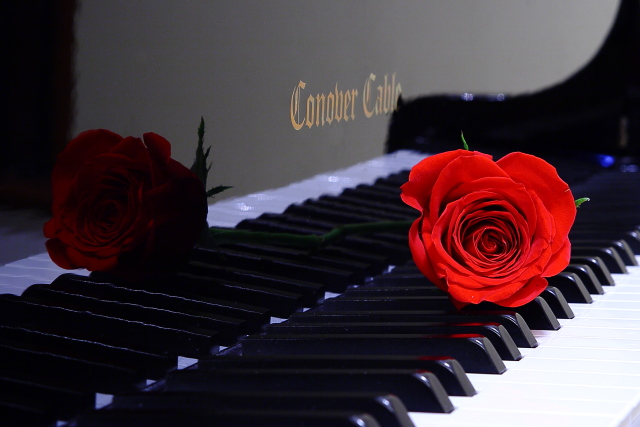
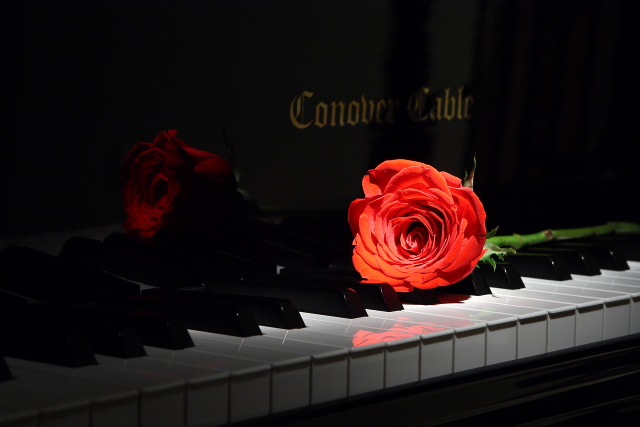
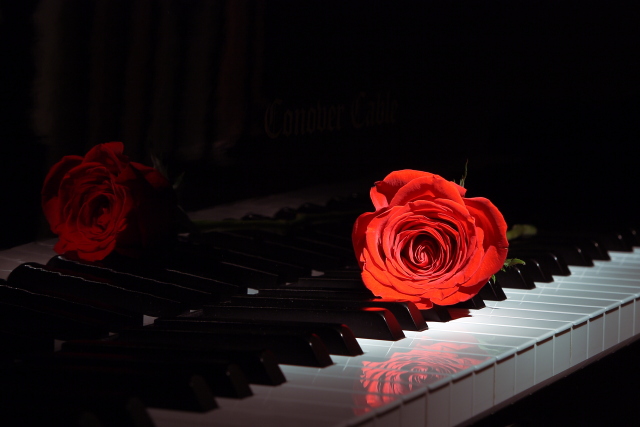
ParticipantOh, and here’s a bit of free advice for all the guys out there: When you run out to the store and come home with a dozen roses (they didn’t sell singles) and your wife asks, “Are those for me?”, the correct answer is “Yes, dear, absolutely” and NOT “No, I needed them for a photo contest.” 😳
/She was actually really understanding about it.
//Although I strongly suspect it would be in my best interests to follow up soon with some just for her. 😉ParticipantThanks for the feedback, everyone. Looks like I’ll be going with #3 (although I’m with you, orionid – I prefer version 2 because I think it looks more like shafts of light, which is what I was going for, but it unfortunately has the visible gold writing.)
ParticipantJanuary 18, 2011 at 2:46 am in reply to: 02-16-11 – Farktography Classic: Software Hootennany 2 #37399ParticipantWell, you can stack exposures, which would give you the possibility of double (or more) exposures after-the-fact. Or all out HDR.
I’m sorry, I didn’t mean for my “whine” to be taken seriously. I don’t want to inject more controversy into the discussion.
What I had in mind for my “request” was to take my lunar eclipse shots from here and make a progression across the sky against a different background shot. That would mean combining multiple completely separate shots into one, which I fully understand is against the rules.
January 18, 2011 at 12:26 am in reply to: 02-16-11 – Farktography Classic: Software Hootennany 2 #37395ParticipantWell, I’d like to be able to combine elements of different shots into one, but you take that, throw in text and re-use, and the next thing you know it’s a free-for-all PS contest, which I don’t think is the intent. So, I can live within the current rules. Unless everyone agrees to change them. 😉 Yeah, I know, no help at all.
January 18, 2011 at 12:03 am in reply to: printer v monitor or why are my prints so different #37899ParticipantCurious, the science behind color models and mapping profiles is a lot more complicated than it would first appear, at least it was to me. I know just a smidgen about it.
I don’t know anything about what you called a paper profile (I suspect it’s the same thing as what I describe next, except applied to particular papers), but a device profile maps the entire color space that can be represented in a particular color model to the actual output gamut of a device. The gamut of a device is the subset of colors that the device is actually capable of displaying. Gamuts differ between monitors and printers because they use different technologies to produce the colors (in addition to other physical constraints). Additionally, the color relationships between these devices is not linear nor comparable across devices even of the same type.
A color model is a mechanism for representing colors. Common models are sRGB and Adobe RGB. Most cameras use sRGB. Neither of those models represent the entire spectrum of visible colors, but they do represent a larger spectrum than can be displayed on most monitors and certainly that can be printed.
A device profile then contains the non-linear function that maps the numerical representation of colors to the physical capabilities of the device so that what you see on one monitor is what you see on another (assuming they’re all profiled) and also what you get when you print.
Monitor calibration isn’t a one-time deal, either, as monitor output changes as it ages. You’re supposed to re-calibrate about once a month. And as far as I know, none of the monitor calibration tools in that price range will do printer calibration because that requires a much more complicated calibration tool.
You might check on the printer manufacturer’s website and see if they have a default profile for the printers. If it’s decent, it might get you close to what you shot (but not necessarily what you see if you don’t calibrate the monitor) and at least should bring some consistency across the different printers. Higher-end monitors also have manufacturer provided default profiles, but that’s hit-or-miss (the one I got from Dell was worthless).
Bottom line is that if you really want WYSIWIG, it’ll cost. I think the Spyder3 package that includes monitor and printer calibration is about $500. I don’t do printing at home, so I just opted for monitor calibration.
If you ever need some help getting to sleep, you can read about color models here: http://en.wikipedia.org/wiki/Color_space and gamut here: http://en.wikipedia.org/wiki/Color_gamut Both of those articles have enough links to further reading to keep you busy for hours.
ParticipantDon’t know if any of you have seen this before, but I printed a copy and keep it in my photo carry bag just in case. I’ve never been hassled while photographing, but it’s good information to have.
ParticipantAnd a quite deserving entry it was, NBD – I liked it a lot.
ParticipantHere’s the final tally on this one: 2748 votes, which puts it almost 1000 votes more than the past 11 contests’ average and at the #17 spot all-time. What I found most interesting, though, is the comparatively low number of entrants and entries in this one:
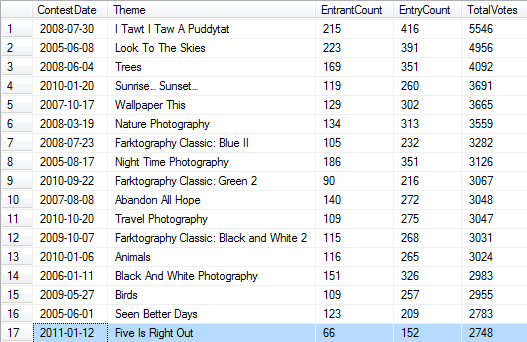
So, something about this one spoke to the voters even if it didn’t get quite as many farktographers.
ParticipantReally nice shots. And I echo what orionid said about it looking like a photog’s paradise. Every shot I’ve ever seen of it reinforces that. I’d love to go someday.
-
AuthorPosts